I have been investing in a solar system at home, since South African load shedding is really getting me down. One of the key elements of going off the grid is to reduce your electricity consumption. I’ve focused on reducing demand by scaling down our geysers from 3 to 1 big one and 1 small undercounter unit. I also managed to find a second hand heat pump, so that geyser is going to be mainly heated using the heat pump.
Whenever I have mentioned my plans to tradespeople, I have uniformly been met with suggestions to move to gas. In South Africa, that means LPG. I wanted to do a comprehensive check on costs, so here is the result of that analysis.
You can find the Python scripts and Jupyter notebooks I used in the analysis here.
Gas
Prices
LPG prices are published by SAPIA. They have separate pages for the current prices and historical prices. Note, if you’re following along, that they appear to have swapped the coastal prices and the Gauteng prices on 2016-08-03 and 2017-08-02, which I have corrected. I have also assumed that the prices quoted here are pre-VAT and have added 15 % to the quoted prices for the sake of comparison. There is a difference around R2/kg between the coastal and Gauteng prices, which has been moving up by a few cents every year since 2017. I have also included an 8 % per year increase on the values since 2015 for reference.
Gas heating value
The main thing you do with gas is to heat things. It is therefore useful to know the gas price not based on the mass (kg) but rather on the ability of the gas to heat things. This requires a quick diversion into “heating values” for fuels. When you burn a fuel, it decomposes into simpler components (gases), which are hot. You can transfer the energy from this hot gas to some cold substance like water or a pot. For LPG one of the gases that forms during combustion is water. Of course, at the temperatures of the flame, the water will be in gaseous form. But if the thing you are trying to heat is cold enough, the water will condense and impart an additional amount of heat on the object. In broad strokes, there are therefore two amounts of energy you can impart on a cold object by burning an amount of gas. One, called the Higher Heating Value (HHV) assumes that you can condense the water. If you can’t condense the water, you get the Lower Heating Value (LHV).
Here are the numbers I’ve used to figure out the heat you can extract from a kg of LPG:
Component
Fraction
LHV
HHV
MJ/kg
MJ/kg
Propane
0.6
46.35
50.35
Butane
0.4
45.75
49.50
Total(LPG)
46.11
50.01
Lastly, we factor in that 1 kWh = 3.6 MJ. For the HHV this works out to 13.9 kWh/kg of LPG. I will be using this factor for the later comparison as it presents the absolute best case of extracting heat to gas via combustion.
Electricity prices
For electricity prices, I have used the historical rates published by Eskom in Excel format on this page. I have used Homepower 1 non-municipal rates including VAT since that’s what I pay at my home. I have again included an 8% increase overlay as a guide.
Since 2013 the Homepower tariffs have been split into two blocks. You pay the lower price on your usage up to 600 kWh/30 days or 20 kWh/day. If you use more, the overage is charged at the higher price. It is important to realise that if you are currently using more than the Block 1 cutoff, electricity savings will save you that full Block 2 tariff until you drop back below 600 kWh per 30 days. It is not correct to reason using your average cost when contemplating savings. Of course, if you are trying to calculate your total monthly bill, you will have to add the monthly connection fee as well, but I have chosen to focus on the marginal costs in this analysis.
Simple comparison
Now we are in a position to compare the energy cost from LPG with electricity. The following chart shows all the prices we have calculated so far. What is clearly visible here is that even in the best case for gas (using Coastal prices at the higher heating value), it never becomes cheaper than the best case for electricity (Homepower 1 block 1). There is some room for a more nuanced comparison when you enter Block 2, especially if you are paying Coastal prices. If you’re wondering about the conversion efficiency of electricity to heat, for applications where you are heating water with a submerged element, it is very near to 100 % efficient.
It’s also worth remembering that I’ve been talking about “best case” conversions for gas. In real life applications it is very hard to extract the full HHV or even the full LLV.
Cost ratios
One way to simplify the analysis further is to compare ratios of costs instead of just costs, since these will stay constant for exponentially growing curves like the ones we’re seeing here. This also has the benefit that it removes the units from our calculations, so we don’t have to worry about whether we’re using kWh or MJ for energy. I will continue from here using Gauteng prices and the HHV for gas since I live in Gauteng and the HHV gives a good upper bound for gas.
We can see in the following graphic that the cost ratios have stayed relatively constant since about 2015. The observation that Block 1 is definitely cheaper than gas is repeated here, but now from the fact that the ratio is less than 1. If you’re in Block 2, the average ratio for the last 5 years is 1.18.
Estimated efficiencies
This all started with geysers, so that’s what I’ll analyse first. Electrical geysers feature submerged elements and almost all the electrical energy will be converted to heat. So the controlling factor will be the gas efficiency. To beat electricity, a gas geyser would have to be more than 85 % efficient, which from my research seems quite unlikely. If you are using a heat pump, with a coefficient of performance of 3 or more, you end up with a clear win in favour of electricity.
For cooking, gas is not particularly efficient, with figures quoted between 40 % and 60 %. Anyone who has found their kitchen warming up due to their use of a gas hob can attest the energy doesn’t all go into the pot. Old school electrical hobs aren’t that great either, since the contact between the element and the pot can be poor and there are also long heating times to contend with. I use an induction hob, which is closer to 90 % efficient. So I guess gas doesn’t come out cheaper there either. I am well aware that many people simply prefer to cook on gas and that having a hob that works during load shedding is very useful.
Alternative explanations of savings
So what is the explanation of the savings that people describe? I have thought of a few alternative explanations:
There might be a psychological “two bucket effect” where the drastic savings on the electricity bill might obscure the extra cost of gas.
The immediacy of many gas applications may result in lower use overall due to less time spent waiting for things to heat up (this is especially true for cooking).
For space heating, the high power of gas heaters may mean that you have a large radiative heating effect resulting in immediate feeling of warmth while electrical heaters may need to heat a lot of air to get the same level of comfort.
For the geyser application, you are keeping water hot, so there are continuous losses. If your geyser is poorly insulated, this can be a big deal. I looked at this technical report which reported about 2 kWh/ 24 h = 83 W of losses from several tested geysers, which I thought was negligible, about the same as an old incandescent light bulb. For comparison, heating 200 L of water from 25 °C to 65 °C uses about 10 kWh. So I guess it depends on the frequency and length of your showers. If you don’t need a lot of hot water, it’s also best to install a smaller geyser.
Note 1: This is an edited version of a full Jupyter Notebook which you can use to follow along with the calculations.
Note 2: All the timings are for CPython 3.9.7 on Intel MacBook Pro (16-inch, 2019)
There are several ways to look up a value in a dictionary in Python.
dictionary = {'known': 'value'}
The most obvious way is straight indexing:
key ='known'value = dictionary[key]
But what if we don’t know if the dictionary contains the key, and we’d like to get a default value if it isn’t?
key ='unknown'value = dictionary[key] # will cause an error
So, we could do this
if key in dictionary: value = dictionary[key]else: value ='default'
But dictionaries also have a .get() method which does basically the same thing. It will return default if the dictionary doesn’t contain the key. If default is not supplied, dictionary.get(key) returns None.
dictionary.get('known', 'default')'value'
dictionary.get('unknown', 'default')'default'
dictionary.get('unknown') isNoneTrue
I have spotted a pattern where people start using .get() all the time, instead of ever indexing. I think this might be because they feel it’s “safer” – it will never raise an exception. But once you start getting into that habit you forget about using in to check if a key is in a dictionary and you start to do things like this:
defget_if_value_is_none(dictionary, key): value = dictionary.get(key)# assuming None wasn't in the dictionary to begin withif value isnotNone: # effectively check if key was in dictionaryreturn value# expensive operation to perform if key was not in dictionary
Note The code above will only work as designed if the dictionary doesn’t actually contain a None. You might also check using if value, but this is even worse as it will also fail if the actual value you’re looking for is another falsey value (like [] or 0), see for example this video where a pytest slowdown was caused by this exact problem. I’ve linked to the time where that code is on the screen.
I commented on that video about using the in pattern instead and Anthony replied “using in is a common performance mistake — it forces you to use two lookups to retrieve the value rather than just one”
This is pretty clear if you compare the code – you’re doing all the hashing and lookup just once with .get() but with the in check you might need to do it twice:
defin_then_index(dictionary, key):if key in dictionary: # first lookupreturn dictionary[key] # second possible lookup# expensive operation to perform if key was not in dictionary
Even though the original version with the get and the check for None is really the thing I don’t like, I’ll also do a version with get only.
%%timeitget_if_value_is_none(dictionary, "known")140 ns ± 1.3 ns per loop (mean ± std. dev. of 7 runs, 10000000 loops each)
%%timeitget_if_value_is_none(dictionary, "unknown")130 ns ± 1.99 ns per loop (mean ± std. dev. of 7 runs, 10000000 loops each)
%%timeitonly_get(dictionary, "known")109 ns ± 5.8 ns per loop (mean ± std. dev. of 7 runs, 10000000 loops each)
%%timeitonly_get(dictionary, "unknown")108 ns ± 4.62 ns per loop (mean ± std. dev. of 7 runs, 10000000 loops each)
%%timeitin_then_index(dictionary, "known")102 ns ± 2.01 ns per loop (mean ± std. dev. of 7 runs, 10000000 loops each)
%%timeitin_then_index(dictionary, "unknown")83.2 ns ± 0.845 ns per loop (mean ± std. dev. of 7 runs, 10000000 loops each)
I mentioned in the video comments that my benchmarks didn’t show get to be faster. Anthony doubted the validity of my benchmaks:
I suspect your benchmarking is incorrect. also for caches the hot case is going to be hits (you tend to optimize for success rather than failure). I also suspect you’re not considering fill size or collision rate in your benchmark. there is a third approach which is even faster via try: ... except KeyError: ... which I usually choose
I think he’s talking about this as a pattern
deftry_index_except(dictionary, key):try:return dictionary[key]exceptKeyError:pass# or return default
%%timeittry_index_except(dictionary, "known")91.3 ns ± 1.12 ns per loop (mean ± std. dev. of 7 runs, 10000000 loops each)
%%timeittry_index_except(dictionary, "unknown")265 ns ± 7.53 ns per loop (mean ± std. dev. of 7 runs, 1000000 loops each)
It’s worth remembering that there is some overhead associated with calling a function in the first place, even if you just return
deffunction_call(dictionary, key):return
%%timeitfunction_call(dictionary, "known")69.3 ns ± 0.68 ns per loop (mean ± std. dev. of 7 runs, 10000000 loops each)
Basic benchmark plotted
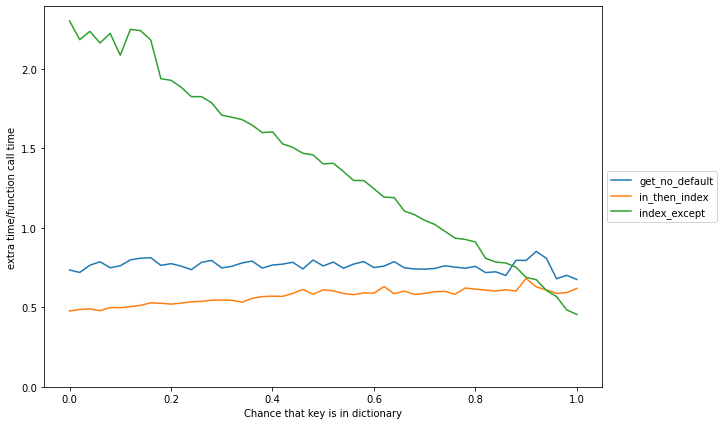
Let’s see what that looks like on a chart, where we can view the trade-offs of a known key vs an unknown key with the function call overhead
We see that just doing key in dictionary (at the 0 chance part of in_then_index) is not that much slower than calling a function and returning. Let’s see what the timings look like with that function call overhead subtracted. I’d also like to insulate these results from differences on machines, so I’m going to normalise by that function call overhead.
From these simple results it seems like we can make the following preliminary observations:
get combined with the is None check is never faster than in followed by indexing, even when you do both in and indexing.
A straight return dictionary.get(value) is a bit better but still slower than in and indexing most of the time
The cost of raising an exception is so high that you’ve got to be very sure that the key is almost always (more than 90%) in the dictionary, but if you are it is the fastest to try to index and then handle the exception if the key is not found.
I will admit that testing this on a dictionary containing only one key is not the best benchmark. There probably aren’t key collisions here and we’re not checking for fill rate.
Also, Python has a special case fast path for dictionaries which have only string keys (see here), so we expect string dictionaries to be faster than heterogenous ones, and both of those to be faster if the keys are built-in objects than if they are custom objects. See also this stackoverflow question about slow lookups for custom objects.
Non-string dictionary keys
So, let’s try some other kinds of keys We know Python uses a super fast method for hashing ints – they just hash to themselves, so we expect this to be pretty quick too.
Lastly, let’s try to create a new hashable class. To make a class hashable, you need to implement __hash__ and __eq__
So we have found a place where get is better, even with that value check! We’re clearly paying the cost of calculating that hash twice in the in_then_index method.
What about defaultdict?
Since I posted this, a few people have asked me to look at collections.defaultdict. I was totally blown away by the results. For string keys, defaultdict with just normal indexing is the clear winner.
For the case with a custom class, there’s something weird going on:
I’ve re-run this benchmark a couple of times and tried to understand why this is happening, but in this particular case it seems when using a defaultdict, it is somehow faster to do the access in a try block than just normally index. If you’re thinking (like I did at first) that somehow the data for try_index_except and only_index just got swopped, remember for the defaultdict we’re never raising an exception.
Effect of dictionary size
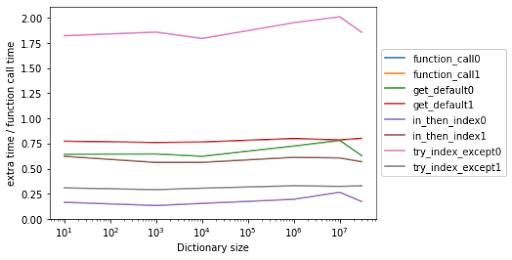
I tried to build dictionaries up to 30 million items in length with unique random strings of 20 character length.
At least for string keys, none of the calls seem to be affected by the size of the dictionary in a way that changes the ordering of the times. Might become an issue at even larger sizes, but I don’t often have 30 million-key dictionaries in my Python code.
Deeper dive
Let’s get a bit more sophisticated about the dictionary and the keys. We’ll build a list of values to look up in a dictionary which has a given fraction of values that are in the dictionary. Note that we’re using strings here. There may be differences in timings due to key collision chances.
I’ve played around with most of the parameters here, and mostly the results later on are dependent of the chance of a dictionary hit.
Time all the things
I then went on a mission to time all the parts of the process which might be pertinent. You should check the notebook for the actual code. The basic setup is always the same – run through the lookup items and do some kind of operation. I’m doing more than one lookup in each function call to reduce the overhead of a function call on the timing.
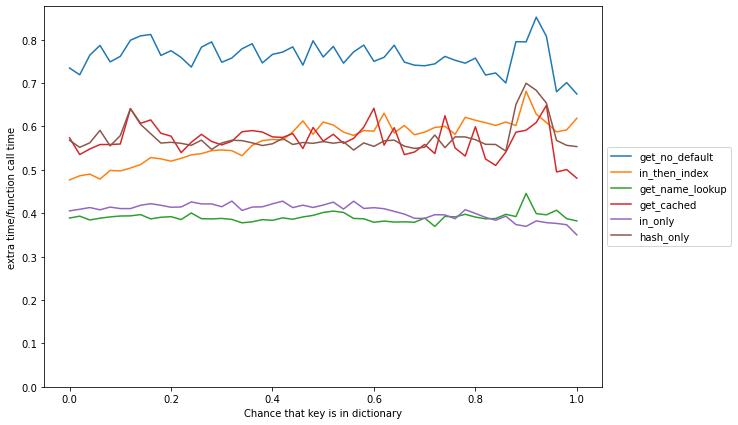
You can imagine that if the dictionary always contains the key, the in + index method will be at its slowest due to the double lookup. Let’s see how the chance of a hit affects timing.
We see that in this more realistic test, the results are qualitatively the same. get is never the best option and in followed by indexing is the best for almost all cases, except when we are very sure that the key will be in the index (again it starts winning aroung 90%). I haven’t done it but I’d expect defaultdict to continue being better than all comers here.
What is going on here?
We are also now ready to understand why this is the case. The first thing to understand is that Python handles dictionaries with string indexes through dedicated code. Another thing to understand is that it takes quite a bit of time for Python to look up the name of .get in the dictionary’s namespace.
In the following plot, get_name_lookup is the time to do get = dictionary.get, while get_cached does get = dictionary.get outside the lookup loop and uses value = get(key) inside the loop. This name lookup effect explains part of the reason why in is faster. I’ve also added the time it takes to do key in dictionary as in_only. This shows that the name lookup is approximately the same as looking up a value in a dictionary, which is expected since object names are stored in dictionaries. Lastly, I’ve added the time it takes to call hash(key).
A fascinating observation here is that it takes less time to do key in dictionary than it does to do hash(key). How can this be? The answer is that the string dictionary code calls hash on the C side. You can clearly see the effect of doing this hashing twice – the graph moves up and to the right, but the cost is much less than you’d imagine because key in dictionary and dictionary[key] both have dedicated bytecodes, so the Python interpreter doesn’t pay the price of calling a Python function twice. This unpacks most of the mystery here.
My final conclusions in the larger case are unchanged from the toy case:
If you have control over the construction of your dictionaries and you’re thinking there’s a good chance that missing values will need to be handled, use defaultdict.
If you are using string or int keys, it’s always faster to do in followed by indexing than to do .get() followed by checking if the default was returned.
The only exception to this rule is if you are almost certain that the key will be in the dictionary, in which case, indexing and handling the exception is (marginally) faster.
.get() is better if you are using custom objects which don’t benefit from the fast paths in Python for hashing and lookup. The performance is similar enough for string types that I’d recommend using get() when you actually want to use the value later in the code.
I couldn’t find any size of dictionary with string keys where .get() was the fastest option.
So, .get() is perfectly fine for saving code when doing value = dictionary.get(key, default) . Just don’t get in the habit of using it everywhere – it’s not saving you any time.