Category: Uncategorized

  • The Crime in South Africa Wikipedia page

    I guess it says something about me that I have a folder on my mac called “pointproving”. One of the things that exists here is my consolidation of the murder rate in South Africa.

    This work stems from another saying of mine. You can never say “Wikipedia is wrong”, you should always say “Wikipedia was wrong”, because anyone can correct errors on Wikipedia. And when I stepped in to the Crime in South Africa Wikipedia page, I was sure there were conflations of the murder rate (murders per 100k people, per year) and the simple number of murders per day. These numbers are in similar orders of magnitude for South Africa (83 murders per day and 43 murders per 100k per year respectively for the last reporting period), and often people will choose the larger or smaller side to make a point.

    I’m particularly interested in the murder rate specifically as it is the least easily gamed crime statistic.

    Data sources

    Solving this issue has involved a lot of reading and researching through the various sources of statistics. To get murders per population I clearly need the number of murders and the population. I therefore have two main sources of data.

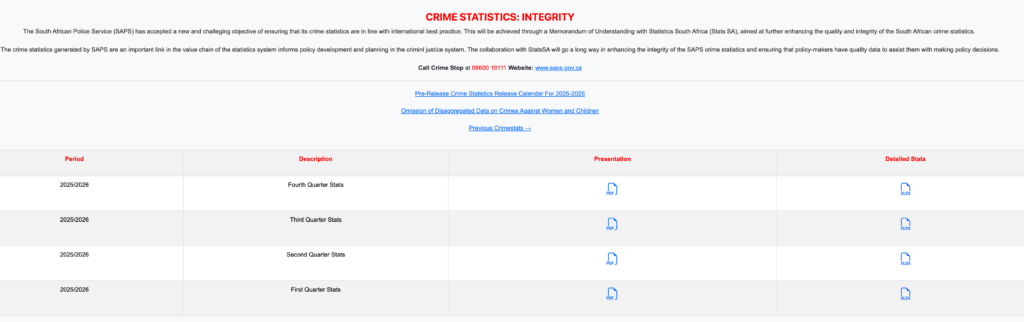
    The SAPS crime statistics page, which has improved a lot since I started doing this in 2019, but has also moved from a single consolidated annual report to quarterly reports and started incorporating their own population estimates in their crime stats spreadsheets. These spreadsheets are not delivered in a format that is easily machine-readable and are slightly different for every year.

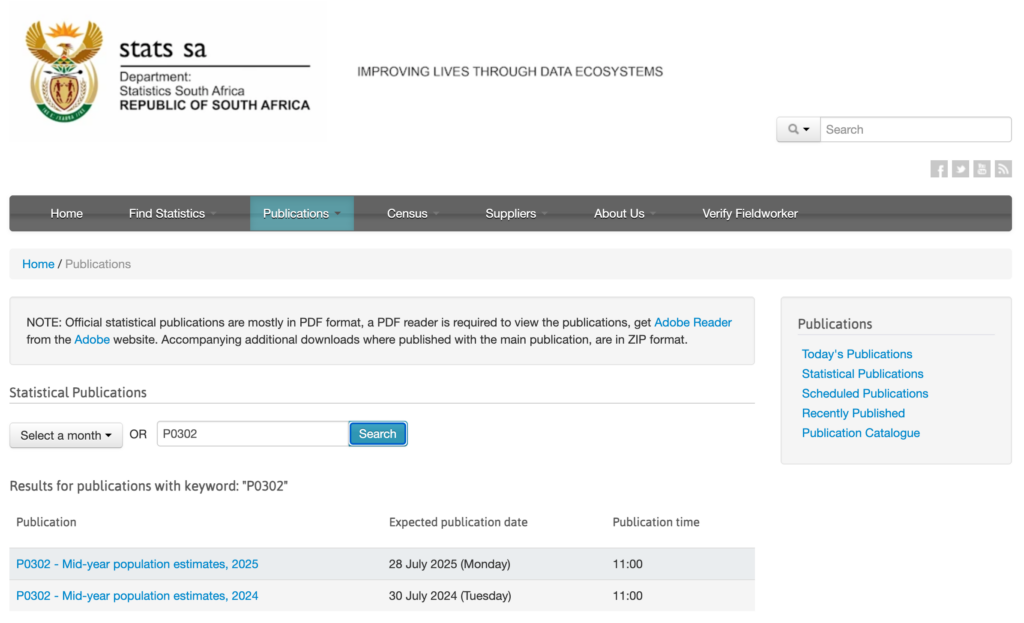
    The Stats SA publication code “P0302”: Mid-year population estimates, on years that aren’t covered by the census and the census data on those that are. In typical Stats SA fashion, there is no stable url that just lists all the individual year’s versions of this publication, you just have to search for P0302 on the search page. At least the lookup code is stable. Again, the data is not in easily machine readable format, but rather a long pdf with narrative and tables.

    What I have done

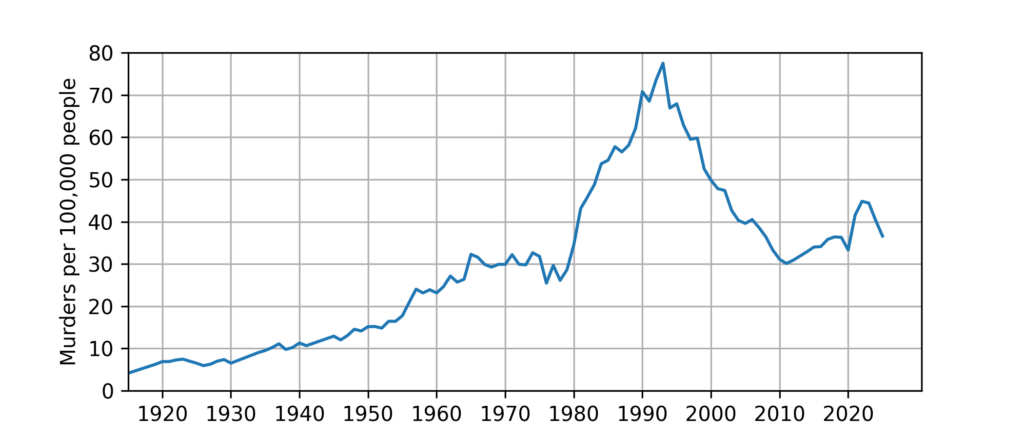
    When I arrived on the Crime in South Africa page, the murder stats were in one big table, and there was a poorly copied long-term stats chart that didn’t connect to the “current” stats that started in 1994. I digitised the chart, ingested the table and made one single chart for the long term.

    Long-term murder rate in South Africa

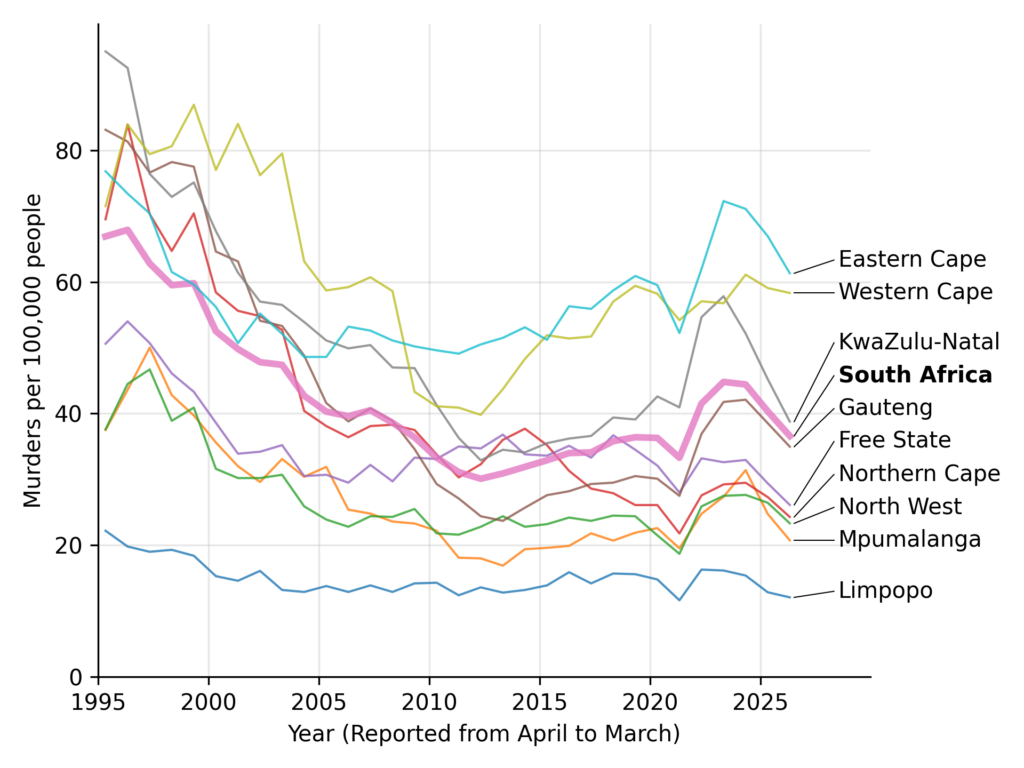
    I also produced a nice per-province chart that I’m quite happy with.

    Murder rate in South Africa by province

    Since 2019, I’ve been updating the page once a year, when the new stats drop from SAPS.

    This was all done “manually”, typing code with my fingers like an animal. I also had to find and incorporate each new version of the crime stats spreadsheets and population estimates laboriously writing new parsers.

    LLM helpers

    For this round of updates I’ve had LLM help and I’ve now got a fully automated pipeline from the spreadsheets to the wiki page.

    This involved creating a bot user on Wikipedia. The whole data set is also now in a sqlite database instead of in several manually-updated spreadsheets and Jupyter notebooks.

    The next round is going to be much less painful and with fewer opportunities for human error.

  • My PostgreSQL CLI setup

    Motivatation

    My database of choice is PostgreSQL. I often find myself wanting to do quick ad-hoc queries against a set of well-defined databases. Maybe I just want to know the internal id of a customer from their name, or check on the status of a job.

    If I’m doing real reporting and producing outputs I will usually spin up PyCharm. It’s got amazing db support, which is the same as you would get from JetBrain’s dedicated database product DataGrip. Great ergonomics, but Pycharm takes a while to get started and frankly the setup of all our dbs is onerous enough that I haven’t registered all of them. I also use pgAdmin, but that’s also tedious to set up “just right”. And sometimes when you’re already in a terminal mindset, you don’t want to jump out to a GUI.

    So I used to ssh into our host and fire up psql. I got laggy input and a bit of a startup-delay due to jumping through our bastion, but it worked well enough that I found myself staring at that no-frills psql prompt a lot.

    But I kept thinking it could be better. I was right. After a few hours of ChatGPT and self-directed browsing and experimentation, I ended up assembling a surprisingly nice terminal-based workflow using:

    • PostgreSQL service configs
    • pgcli
    • pspg
    • duckdb

    The result feels very “close-to-hand”: fast startup, pleasant interaction, integrated with the terminal environment, and has opened up a powerful cross-database workflow.

    PostgreSQL Service Definitions

    PostgreSQL already has a built-in mechanism for naming database connections: ~/.pg_service.conf

    #~/.pg_service.conf
    [prod-db1]
    host=localhost
    port=port1
    dbname=prod_db1
    user=readonly_prod_db1
    sslmode=prefer
    
    [dev-db1]
    host=localhost
    port=port2
    dbname=dev_db1
    user=readonly_dev_db1
    sslmode=prefer
    
    [prod-db2]
    host=localhost
    port=port3
    dbname=prod_db2
    user=readonly_prod_db2
    sslmode=prefer

    This lets you connect using

    psql service=prod-db1

    I’ve set up port forwarding for our dbs so that the different servers are reachable through different ports. The nice thing about a text-based system like this is you can create the entries programmatically, like if you have dev, qa and prod versions of all these dbs.

    Password Management

    PostgreSQL uses ~/.pgpass for password lookup.

    Example:

    #~/.pgpass
    #host:port:dbname:username:password
    localhost:port1:prod_db1:readonly_prod_db1:password1
    localhost:port2:dev_db1:readonly_dev_db1:password2
    localhost:port3:prod_db2:readonly_prod_db2:password3

    Postgres won’t read from this if you don’t set these permissions:

    chmod 600 ~/.pgpass

    Once configured, authentication becomes automatic. If it freaks you out to have passwords stored at rest like this, you can generate .pgpass on the fly and pass it through as an environment variable to a local terminal, too.

    A Better Interactive Client: pgcli

    psql is powerful and reliable, but pgcli makes interactive querying much more pleasant.

    Install with Homebrew:

    brew install pgcli

    Then:

    pgcli service=prod-db1

    This gives you quite a nice interactive experience. As-you-type syntax highlighting, a visible autocomplete, even for those hard-to-remember backslash psql commands, great history searching:

    I can’t say enough good things about pgcli (bonus: check out litecli which is the same thing for sqlite).

    I also edit ~/.config/pgcli/config, which in the default homebrew install gets set to a nicely commented default config, to set table_format = fancygrid.

    A Better Pager: pspg

    Another huge win is having a better pager. Normally, large query results in psql are paged through less, which is not very pleasant for tabular data.

    pspg is a terminal pager specifically designed for SQL tables.

    Install using Homebrew:

    brew install pspg

    Configure in ~/.psqlrc:

    # ~/.psqlrc
    # Some other config I like
    \pset linestyle unicode
    \pset border 2
    \pset null 
    
    # The actual pager
    \setenv PSQL_PAGER 'pspg'

    This gives you a table-aware browser instead of a line-based pager. It freezes headers, allows scrolling and searching in straightforward ways and has a built-in save-to-csv feature (I can never remember the syntax for outputing to csv in postgres). pgcli also supports this by setting pager = pspg in the config

    Themes and Colors

    The default coloring in pspg doesn’t quite match my preferences. Fortunately it has configuration in ~/.pspgconf

    # ~/.pspgconf
    theme = 17 # Solarized Dark
    border_type = 2
    force_uniborder = true
    ignore_case = true
    

    More theme information is available from their github page.

    Maybe an even better pager: visidata

    As I was writing this, I came across an intriguing idea, using visidata as a pager. This gives you even more interactivity, but has a steeper learning curve. I’ve been using visidata for a while for quick CSV viewing, and this intrigued me, I might do a different post on those results.

    DuckDB Changes Everything

    The biggest surprise for me was how nicely DuckDB integrates into this workflow.

    DuckDB can attach PostgreSQL databases directly:

    LOAD postgres;
    
    ATTACH 'service=prod-db1'
    AS prod_db1
    (TYPE postgres, READ_ONLY);
    
    ATTACH 'service=prod-db2'
    AS prod_db2
    (TYPE postgres, READ_ONLY);

    At that point you can query across completely separate PostgreSQL databases:

    SELECT
        a.field1,
        b.field2
    FROM prod_db1.public.table1 a
    JOIN prod_db2.public.table2 b
        ON a.id = b.foreign_id;

    That’s an astonishingly powerful capability for ad-hoc investigation work.

    DuckDB’s default output and paging is already pretty nice, but they support custom pagers, too.

    Lazy Database Attachment

    One downside of having all the attach statements in one file is that DuckDB will connect to all of them on startup. So I ended up using small helper files.

    Example:

    -- ~/.duckdb/prod-db1.sql
    
    LOAD postgres;
    
    ATTACH IF NOT EXISTS 'service=prod-db1'
    AS prod_db1
    (TYPE postgres, READ_ONLY);
    

    Then inside DuckDB:

    .read ~/.duckdb/prod-db1.sql

    This gives explicit, lazy attachment only when needed.

    Final word

    This all took a bit of time to reserach and implement, even with ChatGPT giving me a lot of help. I’m reminded of the first time I spent some time customising my zsh.

    For quick investigative work, it has really made some of the older parts of my workflow feel new again.

  • How do I learn?

    I’ve got a complicated set of feelings when it comes to learning. I dislike the idea of “tricks and tips” and my early encounters with people trying to teach me how to learn all had this “life hack” flavour to them. We had a huge push of Edward de Bono‘s methods when I was in high school, making mind maps and trying to explain “how the brain worked”. But many of these techniques felt unnatural to me. The advice to make humorous or extreme pictures to remember things just makes me feel silly. And I never derived the joy de Bono talks about from making mind maps. It felt performative. And we never covered spaced repetition and real scientific studies of memory.

    I bounced off supplementary mathematics classes where it seemed like they were just teaching to the test, and I felt infantalised by the upbeat smiling faces and cartoons in the notes. I felt myself more serious than that.

    So, I entered university having rejected many good practices and worked through my whole academic career with a system that worked for me but failed in spectacular ways every now and again.

    I fell victim to a common problem of mistaking the sense of familiarity with real retention. I read and re-read textbooks and knew intimately the pain of being able to picture the exact place in my book where the knowledge I needed in the exam was but not being able to recall it.

    I failed organic chemistry twice because I didn’t consider using old exams as learning.

    Later, as a lecturer, I gave my students poor advice, because I didn’t understand the mechanics of learning that well, even as I was trying to put things together by reading books like How people learn.

    On the other hand I had an obsession with application which at least seemed to make up for my deep disdain for doing the exercises in textbooks. As a student I would do a lot of re-summarisation of subjects I enjoyed and I would spend many hours programming implementations of algorithms into my calculator or computer. I would also try to apply methods to solving problems in my own life.

    Later as a lecturer I re-implemented almost everything in my courses using computer methods. Excel, Matlab, Octave, Python.

    These applications cemented my knowledge in ways that are hard through theory alone.

    The thought that started this post was a common issue I had when I mention new tools to people – they will say “when I have a few weeks open, I’ll learn Python” or whatever the tool is I’m talking about. But I believe that you learn better by trying to solve a real problem with the tools you have. I’ve found I often break even with the time I would have spent if the tool is good. In fact, I’ve often used that as the mark of an excellent tool, it pays you back for learning it in the first use.

    Perhaps my issues with these learning techniques is that the payoff is much longer. It’s hard going to start a spaced repitition schedule and stick with it, and you’re not learning any faster, in fact you’re slowing things down! As I’ve grown older I’ve started appreciating the slow wins, too, and perhaps noticing that my daily practice of trying problems with different tools and exploring new methods is also a slow burn rather than an immediate win.

    Now I’m using LLMs all the time to produce code, and I’m trying to figure out the line between learning how to use these tools better and re-investing on learning my existing ones or new ones like Javascript and front-end. I’m constantly needing to remind myself to keep learning without being distracted by outputs.

  • Make more to throw away

    I’ve been thinking again about the old engineering advice:

    “Build one to throw away. You will anyway.”

    The phrase is often attributed to Fred Brooks, although versions of the idea appear throughout engineering culture. I first encountered it in discussions of hardware and industrial design, where it is common to build rough physical prototypes out of cardboard, foam, or scrap material before committing to expensive tooling and manufacture.

    These rough prototype exist to answer questions like:

    • Does this shape actually make sense in the hand?
    • Is this arrangement awkward?
    • Are we solving the correct problem?
    • What assumptions break when exposed to reality?

    The interesting thing about these prototypes is that everybody already understands that they are provisional. Nobody mistakes the cardboard mock-up for the final product.

    Software is theoretically even better suited to this kind of exploration. Git branches are cheap. Directories are cheap. Refactoring tools are cheap. And now AI systems can generate large variations of implementations almost instantly.

    And yet, despite repeatedly advocating for generating alternatives and exploring solution spaces, I’ve realised that I rarely build genuinely competing implementations myself.

    That observation bothered me.

    “Once it works, we don’t want to change it”

    I started thinking about this again after rereading this 2020 blog post by George Stocker discussing the phrase in the context of TDD. One line in particular resonated with me:

    “Once it works, we don’t want to change it.”

    That feels profoundly true.

    The moment software works, it undergoes a psychological transformation. It stops feeling like an experiment and starts feeling like the solution.

    I think several cognitive biases suddenly snap into place simultaneously.

    The first is the endowment effect. Humans consistently overvalue things they already possess relative to equivalent alternatives. A working implementation feels valuable partly because it already exists.

    The second is the sunk cost fallacy. Every ugly workaround, every debugging session, every hard-earned insight starts exerting pressure against restarting or exploring alternatives. The pain invested in the system becomes an argument for preserving it.

    And then there is perhaps the strongest force of all: confirmation bias.

    A working system is extraordinarily persuasive evidence. It screams “See? It works.”

    But it only proves one thing: that the approach is possible.

    It does not prove:

    • that the architecture is good,
    • that the design is maintainable,
    • that the constraints were properly understood,
    • or that the design space was adequately explored.

    And yet psychologically it feels like confirmation that we are “on the right track”. I’ve marked students down for this mistake of going for the first thing that worked in designs many times.

    The four-card problem

    I recently watched a discussion of the famous four-card reasoning task developed by Peter Wason.

    You are shown four cards. Each card has a letter on one side and a number on the other. You are told a rule such as:

    “If a card has a vowel on one side, then it has an even number on the other.”

    The task is to decide which cards must be turned over to test the rule.

    Most people choose cards that could confirm the rule rather than cards that could falsify it.

    The correct reasoning is subtle. To test the statement properly, you must actively search for disconfirming evidence.

    This is deeply unintuitive for humans.

    Science itself is largely a cultural technology built around compensating for this weakness. Hypothesis testing, controls, replication, adversarial review — these are all mechanisms designed to force us into falsification-oriented thinking because it does not come naturally.

    And software engineering is not immune.

    A working prototype is the ultimate confirmatory evidence:

    “Look, this can solve the problem.”

    But perhaps the more important question is:

    “What competing approaches did we fail to seriously investigate because this one started working first?”

    The multiverse problem

    I suspect there is also a cognitive limitation here that goes beyond simple bias.

    Technically, maintaining alternatives is cheap, but mentally, it is expensive.

    Once I have a project directory in front of me, I naturally start treating it as the canonical reality instead of one branch in a multiverse of possibilities.

    I think this is one reason software exploration is harder in practice than it appears in theory.

    We often talk as if software design is just a search problem:

    1. Generate alternatives.
    2. Evaluate alternatives.
    3. Select the best one.

    But this assumes we can stably maintain several competing models simultaneously in our minds.

    In practice, I think humans collapse possibility space very early.

    As soon as one approach accumulates enough detail, enough code, enough explanatory coherence, it becomes psychologically privileged. Alternative realities become harder to inhabit sincerely.

    This is perhaps why teams frequently outperform individuals on exploratory work. Different people can independently inhabit different solution spaces. One engineer can become convinced that event sourcing is the correct architecture while another sincerely explores a relational approach. Their disagreement preserves diversity in the search space.

    An individual mind struggles to do this honestly. Once we commit to a narrative, alternatives start feeling like attacks on accumulated understanding rather than legitimate possibilities.

    The Joel Spolsky tension

    Of course, the opposite failure mode also exists.

    Joel Spolsky’s famous essay Things You Should Never Do, Part I argues strongly against rewriting software from scratch. His argument is often caricatured, but there is an important truth in it: long-running systems encode enormous amounts of tacit knowledge.

    A mature system is not merely source code. It is a fossil record of collisions with reality.

    That bizarre validation rule probably exists because of a customer incident from 2017. That ugly retry loop may encode a production failure nobody fully remembers. That seemingly unnecessary timeout might represent weeks of operational pain.

    Rewrites often erase knowledge faster than they create clarity.

    And so there is a genuine tension here:

    • explore too little and you prematurely lock into mediocre designs,
    • explore too much and you repeatedly discard hard-earned knowledge.

    The ideal time to throw something away may actually be immediately after proving it works — exactly the moment humans least want to do so.

    AI and the explosion of possibility

    I think modern AI systems may amplify this entire dynamic dramatically.

    For years, generating serious alternative implementations was expensive enough that most teams simply could not afford much exploration. The first plausible architecture naturally won by default.

    But now the economics are changing.

    You can ask an AI assistant to

    • generate a second implementation,
    • refactor toward a different architecture,
    • prototype an entirely different interaction model,
    • or produce multiple candidate APIs,

    in minutes.

    The cost of generating alternatives is collapsing.

    But our cognitive habits have not changed nearly as quickly.

    We still emotionally anchor on the first thing that works.

    In fact, AI may make this worse. A compelling demo exerts enormous gravitational pull. Once stakeholders can click buttons and see behaviour, the prototype rapidly acquires political and emotional inertia regardless of architectural quality. I’ve seen this cut both ways, because early prototypes can also elicit disproportionally intense critiques of minor details.

    The prototype becomes real long before it becomes good.

    Designing systems around bias

    In general, knowing about human cognitive bias is only useful if we build systems around it.

    • Procurement processes often require three competing quotes because we know people anchor too quickly on the first acceptable option.
    • Science forces replication and adversarial review because individual researchers cannot reliably falsify their own ideas.
    • Checklists exist because memory is unreliable.
    • Code review exists because authors are blind to their own assumptions.
    • Prediction logs and notebooks exist because humans rewrite their own history after outcomes occur.

    Perhaps software exploration deserves similar institutional support.

    If generating alternatives is becoming dramatically cheaper, maybe we should sometimes require competing prototypes before committing to a direction.

    Not because prototypes are precious.
    But because working software is such dangerously convincing evidence.
  • Digital authenticity is really about provenance

    On a recent podcast, a host compared AI-generated content to a magician sawing a woman in half. You hear this a lot: AI outputs are illusion, something that looks real but isn’t.

    That’s a category error.

    When a magician “cuts” someone in half, no one is actually cut. Reality and appearance diverge. But when a model generates Python code, it is real Python code. It runs or it doesn’t. There’s no hidden assistant holding the application together.

    You can expose the magician’s trick by examining the woman more closely. But examining code will not allow you to prove it was written by a human.

    Digital artefacts are numbers, not atoms. Matter has physical identity. Numbers don’t. Digital copies are indistinguishable from originals, and the thing itself contains no trace of its origin. So arguments about “AI authenticity” aren’t claims about the output, they’re claims about provenance.

    That’s a very different problem.

    Does provenance matter? I hear people say they feel cheated discovering a song they loved was AI-generated. They feel that art has less value without a human story behind it. You might also be concerned that you’re being charged for more hours than the task actually took due to automation.

    That’s legitimate. But it means authenticity can’t be solved by slapping a “Created by AI” label on things. That approach is operationally burdensome, trivially easy to evade, and focused on policing outputs rather than clarifying expectations.

    Once you understand if your claim is about the bits or the provenance, you can focus your attention in the right place.