It’s interesting how your tools affect your choices and how you can end up in a place which works for your current needs but doesn’t make the next step you’re trying to get to easy.
To understand my current situation regarding managing my files, it’s probably best to go into a little bit of history.
Early computer use: no syncing
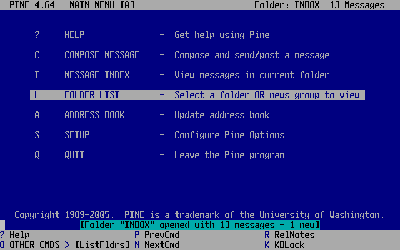
I enrolled as an undergraduate in 1997. When I arrived on campus I was given my very first e-mail address and I remember spending huge amounts of time in the computer labs writing to all of my friends (using a program called Pine, which looked like this):
 |
| Pine screenshot |
Files were small and you carried them around with you on things that we called stiffies. The Americans called them 3½-inch floppy disks. The capacity of a stiffy was 1.44 MB. This was enough for most of your work in a semester. Stiffies were notoriously unreliable, so you never really worked on the disk only, because for all you knew, they could die tomorrow. Stiffies were for moving files from one computer to another, not for long-term storage. Some people had CD writers, but campus computers didn’t.
I didn’t have a computer in my res room until my second year, and when I did it wasn’t connected to any kind of network until third year. I could only check my mail and do IRC on campus computers.
Once I got a computer in my room, an issue emerged: sometimes I would start working on something in my room and I would need to continue working on it on campus. So I would copy it to a stiffy and ride my bike to campus, where I would copy it over and keep working. This process led to copies of the files on both machines with no clear way to keep track of which one I had worked on last. So if I forgot my disk on my desk and worked on the campus copy instead of the version I had in my room, things would break. Luckily files were small at first, but technology rapidly improved and by final year (2000) we had CD writers. At this point, we had Internet connections, but they were so slow that it was much faster to burn a CD and bike to campus than to send the data over the Internet. The fastest dial-up modem speed was 56 kbps, which would require more than a day to transfer the 700 MB that fits on a CD.
For my entire undergraduate career, therefore, I could never sync my account on campus with my computer at res or the one at home. I just had some random files in various places which I had to transfer piecewise.
Postgraduate: two computers, external HDD
When I enrolled for my Masters in 2001, I moved into a lab and got assigned a computer. Now I had a computer in my room at res and one at the lab and I often found myself having to transfer files between them. I installed a removable hard-drive bay enclosure and had a hard drive that I would shuttle between the two locations. Moving things this way was a big deal. IDE hard drives don’t support hot-swapping, so I would sync to the hard drive, turn off my computer, remove the hard drive and then boot up with the hard drive in place at the new location. I believe that this hard drive was either a 500 MB or 1 GB. It is around this time that I started using
Unison to sync the external hard drive to the machine where I was working. This meant I could survive forgetting to bring the hard drive to the lab, since Unison stores a hash of all the files and can recognise if two files have changed. I synced basically all of my files except for music files and movies, which were too large to fit on this external hard drive.
Two desktops, laptop, local network
When I started working for the University of Pretoria in 2003, I continued to use the HHD sync strategy for a while, and when I got a laptop, I started treating it similarly to the HHD – I would use Unison, but now using the (wired) network to connect the machines instead of plugging in a hard drive. I continue to use this strategy today. Every morning before starting to work on my desktop, I sync. Every evening before leaving, I sync. This way I have a complete copy of my working files on both machines (my laptop and my desktop). This provides a level of redundancy (I don’t think of this as a backup strategy, that’s handled by Bacula on my desktop and these days by Time Capsule on my laptop).
A change: cheap Internet
During my first couple of years at the university, we were charged R1/MB for internet access. Let me repeat that in units that make more sense to a modern reader: that’s R1000/GB. This means that any kind of large file transfer using the Internet was completely out of the question. It also led to me turning into a packrat. Since downloading software or even articles was so expensive, I developed a huge folder of downloads that I would maintain to avoid having to re-download files.
Rummaging around my old e-mail, I find that in 2005 we had a limit of R60/month in place. That’s right, ten years ago the University limited my monthly bandwidth to 60 MB. In 2011 we were being charged 16 c/MB (R160/GB) on student access, but staff caps had been dropped.
Dropbox launched at the end of 2008, registering dropbox.com in 2009. This is when the idea of easily syncing files over the Internet really started taking hold. I think I installed Dropbox in 2010, when our IT department dropped caps.
At the moment I use Dropbox for sharing files with other people and I still use Unison to handle syncing the files on my laptop and my desktop.
A remaining issue: campus proxy/firewall
Even though we are no longer charged for Internet access on campus, we still have to log in to our proxy server to get access to the Internet. This does not work transparently for all applications. In addition, for obvious reasons, we can’t set up a server on a machine inside campus which will be visible off-campus. I have only recently (early 2015) been able to set up a virtual machine inside our DMZ which would allow me set up a central repository for files.
I have to switch Dropbox between proxy and no proxy every time I move from home to campus.
Side-effects
Because I built my syncing strategy when Internet access was either slow or expensive or both, and because I’ve been working on two different computers regularly, I have avoided dependence on client-server technologies. Specifically, I have not depended on a client-server database like
MySQL or
PostgresSQL. Instead, when I required SQL database functionality, I’ve use
SQLite, which allows me to continue with the file-based syncing strategy.
But now I’ve started investigating NoSQL technologies like
Mongodb or
Redis (and later, perhaps something like
Hadoop). It doesn’t appear as though these things have a simple file-based alternative similar to SQLite.
Why change what works?
It is clear from my interaction with industry that their model is very solidly built around central databases with access from clients. This is a similar model to all the Internet services we use now. I’m familiar with setting up these systems, but my students and I often have only intermittent access to the the Internet. The students because they can’t afford it, myself because I travel using the Gautrain, and often have to work in a disconnected state. Not to mention load shedding.
Now I am interested in building a better system which has some of the nice properties I have come to rely on with Unison, or at least allows for limited offline use with periodic syncing. I know this will not be as simple as setting up two directories to sync, but I’m getting the horrible feeling that each system will have its own problematic story and that the central server strategy is just a way of avoiding sync rather than a solution.
If anybody has a suggestion, I’d be pleased to hear it.

Leave a Reply