Category: Uncategorized

  • Managing scientific data and interchange with industry

    I spoke at a recent symposium on the difficulties in managing data interchange with industry.

    Just for some context, “industry” here stands for personnel involved in process control and modelling activities. My direct experience is in the petrochemical, mining and paper and pulp industries. I also show an example of data from a piece of analytical equipment.

    I’ve uploaded the source on GitHub here, and you can see the notebook without downloading it by using NBViewer.

    I’ve spoken about the pattern of intermediates on this blog before (in a slightly different context).

    Notably absent from this discussion are any kind of database, since my experience is that if you can’t e-mail it, it might as well not exist when talking to the kinds of people I work with. I’ve used sqlite quite extensively myself, but I have found most people want something they can double-click and just have it work.

    If you have different experiences, I’m always eager to learn. I am specifically interested in how people who use client-server databases for their data handle the problem of interchange.

  • Public transport in SA is not user-friendly enough

    I use public transport almost every day to get to and from work. I am a very happy user of the Gautrain train system. This causes some interesting problems and makes my life much harder than it should be when I have to go anywhere other than between my home and work.

    The Gautrain website is relatively informative about where the bus stops are and where the associated Gautrain buses go. The routes are presented in one interactive map on their website. I would have preferred if these routes were added to the Google Maps interface, because planning a trip means having two maps open – one view to the Google Maps interface so that I can search for the place I want to go and another view tediously synced to that one so that I can see if there is a bus near where I want to go. Sadly, this is the most user friendly public transport system I can use in my country. Here are some significantly more difficult-to-use alternatives.

    Tshwane bus

    I work at the University of Pretoria. Because I take the train to work most days, I don’t have access to a car when I am there. This means I have often tried to figure out how the Tshwane bus system works. Unfortunately I have never successfully planned a trip using this system as their timetables are completely opaque to me. The timetables are online, but the routes are simply listed in “Alphabetical order” and “Clockwise order” using the names of the routes. It appears that the routes are mostly concerned with going in and out of the CBD from the named suburb. Now, I lived in Brooklyn for five years, so let’s have a look at the Brooklyn route:

    BROOKLYN (10) 


    ROUTE OUT
    : From Thabo Sehume (Andries) between Pretorius & Francis Baard (Schoeman). Drive along Thabo Sehume, left along Jeff Masemola (Jacob Maré), Rissik, Justice Mahomed (Walker, Charles), Atterbury, Lois, Garsfontein, Corobay, Tucker, Gina, Corobay, Garsfontein, Anton van Wouw, Beethoven, Chopin, Duvernoy (Terminus). 


    ROUTE IN
    : Via Duvernoy, Lilken, Rover, Rudolf, De Klerk, Hermina, Rudolf, Rover, Beval, Coert Steynberg, Hugh McKinnel, John Scott, Issie Smuts, Duvernoy, Chopin,Beethoven, Anton van Wouw, Garsfontein, Corobay, Tucker, Gina, Corobay, Garsfontein, further the same in an opposite direction as far as cnr. of Justice Mahomed (Walker) & Bourke, via Justice Mahomed (Walker), Scheiding, Bosman, to City.

    I challenge anyone to use this without a pretty detailed street map in their hands. Doesn’t it make more sense to present this information in map form? Of course it does, that’s why this website exists, where a couple of people have taken it on themselves to get this information in map form, like this:

    Brooklyn 10 in graphical form

    Isn’t that much easier to understand? That website also allows you to add and remove a variety of routes so you can see which ones intersect and so on. Good stuff. Unfortunately it doesn’t show the location of the stops, nor does it assist you in route planning, so I can’t see how to get from the Groenkloof Nature reserve to the Menlyn Park Shopping centre in an easy way. In their defence, it does seem as though Tshwane have gone to the trouble of building a complete map of the bus system as one massive PDF which is designed to be printed out on A0 paper. Because most of us have an A0 printer hanging about. The big PDF does show you how poorly the bus system is designed to get around town rather than just go from your suburb to the CBD and back – there are almost no buses connecting around Pretoria, all just spokes emanating from the CBD hub:
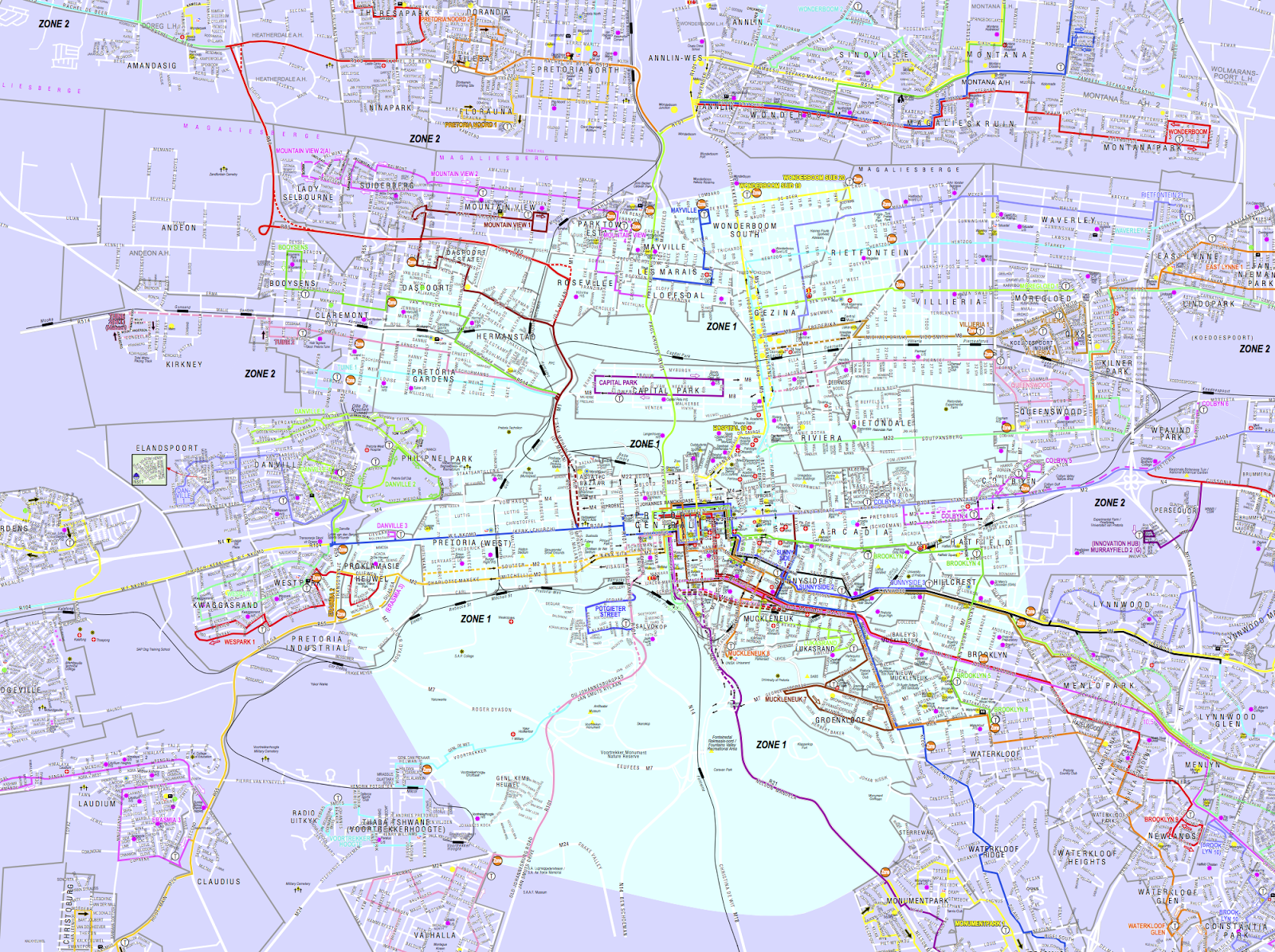
    The hub-and-spoke Tshwane bus system
    So, this is not a good system for me to use to get where I want to go. I suppose I should be using taxis, but I’m a big fan of planning my route, so I’m not that comfortable with the idea of going to the taxi rank and asking around to find out which taxi will take me where I want to go.
    Another hope is the new Tshwane Bus Rapid Transit system, A Re Yeng. Right now that website doesn’t contain much information, but at leas the proposal document contains maps of the routes.

    Johannesburg

    The event that prompted this post was me trying to work out if I could get from Pretoria to the University of Johannesburg Kingsway Campus using public transport. I knew I could easily get to Gautrain Park station, but how to get West from there? I had seen a BRT station outside of the UJ campus, so I though I would be able to take that. The Johannesburg system is called Rea Vaya. I went to their website and was initially pleasantly surprised. They have maps of their routes! Unfortunately the interactive map appeared to show that there wasn’t a Rea Vaya route that went to the Kingsway campus, only a Joburg Metro bus, which wasn’t running at the times I needed to get to my destination. Luckily, I Googled around and found this brochure which has a more up-to-date map and mentions UJ Kingsway Campus as a stop on the T3 line. Armed with this knowledge I was able to find the T3 route “map”:
    The T3 Rea Vaya “Map”
    This is worth almost less than the Tshwane bus route descriptions as it is not searchable (being an image) and it gives no indication of direction. This kind of description is useful on the bus as it gives you a sense of how many stops you need to wait before you get off. It is useless off the bus or when planning routes, as it doesn’t allow for any kind of discovery of the information.
    An interesting extra point is that the website makes it very clear that you need a smart card to use the Rea Vaya bus. The page about smart cards proclaims “If you don’t have a smart card yet, you can get one – for free – from any of the five Rea Vaya customer care centres.” Of course, the exact location of these customer care centres is left as a delightful treasure hunt for the user. They aren’t indicated on any of the maps I found on the website. In fact, the only mention of customer care centres I could find was in the above mentioned brochure where they list the following six customer care centres:
    1. Carlton Centre East Rea Vaya Station (CBD)
    2. Johannesburg Art Gallery Station (Joubert Park)
    3. Orlando Police Station (Orlando)
    4. UJ Sophiatown Station (Melville)
    5. Indingiliza Terminus (Dobsonville)
    6. Bosmont Station (Bosmont)
    Clearly this system is targeted at people who already know the Johannesburg area intimately. How would a traveller coming from overseas, landing in OR Thambo and then proceeding using the Gautrain to Park Station obtain a Rea Vaya smart card? I suppose they would need to find each of these locations on their map and then perhaps walk there.

    Update: For future reference, I have determined that the Johannesburg Art Gallery station (number 2 in the list above) is the Rea Vaya customer service centre closest to the Gautrain Park station, by using this interactive map. It must be said that you still need to do way too much work to get to this information.

    When I tweeted @ReaVayaBus to seek help (“If I arrive at Park station on @TheGautrain, but I have not yet bought a smart card, can I buy a smart card there?”) , I got the noncomittal reply “You can get you Rea Vaya Smartcardat any Rea Vaya customere care Centre”. Because “You can get a smartcard at the Johannesburg Art Gallery station, 10 minutes walk from Park Station” would make it too easy.

    I’m not even going to start with the analysis of the Johannesburg Metrobus system as their routes are even more difficult to ascertain that the Twshwane ones.

    How it could (should) be

    Compared to my recent experience navigating through Barcelona, a city where I don’t even understand the language of most of the people or signs, public transport in SA is a nightmare. In Barcelona, I could use Google Maps on my phone to navigate to a place by simply typing its name into my phone. I was routed along the nearest set of public transport services completely automatically. I didn’t have to worry about finding stuff at all. In fact, the Gautrain has at least been incorporated into Google Maps, but the bus systems have not yet been, so I can get close but not really all the way. The Google Maps transit system is amazing. I can route and plan my journey with amazing ease, taking the times of the trains into account properly and it would allow me to figure out my cross-overs to the bus, but of course, that information is not on Google right now. If I were involved in the Johannesburg or Tshwane transport system I would be trying as hard as I could to work with them to get the information on their systems. This would be a thousand times better than trying to develop a system themselves.
    All route planning should be like this
    Now I suppose I’ve spent far too much time ranting about this, but I felt like I should at least get something out of all the time I’ve spent on these websites. My final decision was to take the car.
  • My programming history (part 1)

    I have been programming for a pretty good fraction of my life. In that time, I’ve thought about what my goals were in many different ways. This post is an attempt to get some of these thoughts to stand still for a while.

    In the beginning

    I started programming before the internet was widely available. Some of the first memories I have of programming is learning LOGO on green-screened Comodore 64s at school (this would have been around grade 1, when I was 7 in 1985) and copying BASIC code from magazines on our XT computer (perhaps a little later, around 1988). The most difficult programs were the ones that contained pages of hex codes for pre-assembled parts of program.

    Hex codes for a program on a magazine page

    At this point, I didn’t have much of a grasp on the techniques involved, but this was a cool way to get the computer in our garage (my mother wouldn’t allow it in the house) to do things. In many ways this was the predecessor of today’s copypasta programming culture: many people who don’t really know what the codes do copying from the sages to get something useful. I was intrigued and started digging into my dad’s copies of the BASIC manual that came with the computer, slowly teaching myself how this stuff worked. I must give a lot of credit to my dad here, as he was always keen to point out how I should be using functions or other programming structures. He had experience with programming as a systems analyst.

    I did computer science in school. We learned Turbo Pascal. I was initially not very fond of this, as I preferred the Borland C++ environment. In Std 9 I helped to organise the movie-themed matric farewell and wrote a database program (in C++) which allowed us to print tickets at the gate, as though you were going to a movie. This was using the text-mode library I had developed which looked a little bit like curses (although I didn’t know it at the time).

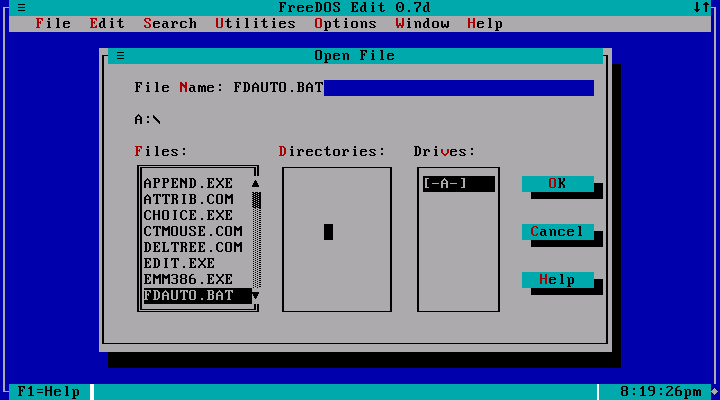
    Text-based interface similar to the one I wrote

    As a final matric project I developed a program which would help you set and solve crossword puzzles. Initially I had wanted to make it automatic, but I couldn’t sort out the algorithm, and I had my hands full as it was developing my own graphics library which handled graphical input on a grid and also had a whole font system and mouse access working via hand-tuned assembly routines in Mode 13h. Because we used Turbo Pascal for school, I used that. Turbo Pascal allowed for very easy inclusion of assembly in functions, and I used it perhaps more liberally than I should have. I was quite proud of this program, but I will admit that it was terribly written.

    By the time I was finishing school I was programming for fun and profit. I wrote a Windows program to look up vendor information based on postcodes for call-center operators which I ended up selling to an insurance company. I had migrated from Visual Basic to Delphi when I started learning Pascal in school and had also learned about SQL databases and through contact with these industry programmers.

    Up until this point, most of the programs I had written were basically user interfaces. The problems the programs solved weren’t particularly complex algorithmically, but the trick was figuring out how to allow interaction and how to make certain effects happen on the screen.

    Hand-coding assembly is a waste

    I had a couple of friends who were into the same things, including running a BBS together. Through the BBS, we got into the demoscene and I was driven to figure out the techniques they were using to get the computer to do these amazing things. We would try to outdo one another with optimising our graphics routines. For instance, we would calculate frame rates at line drawing. The kinds of problems I was solving here were more satisfying to me on the algorithmic level. It felt really good to go from a naive line implementation to the Bresenham’s line algorithm and see the huge difference an algorithm could make to rendering speeds.

    I hand-optimised my assembly code and dug into the technical reference manuals while one of my friends wrote more portable C code. When the Pentium chips came out my hand-optimised code was now outperformed by his due to the power of a good compiler. This was a breakthrough moment for me – I realised that this time I had spent had not been a good investment. It had won in the short term, but in the long term higher level languages would win over lower level ones.

    So, when I got to university and learned Matlab I was intrigued by how much I could do with this small amount of code. Around this time I also started to get into Linux (another thing I had been introduced to on the BBS) and there weren’t really many cross-platform GUI libraries at the time, so I ended up focusing on what I liked best: algorithmic developments which would lead to faster solutions. Looking back now, I guess that Matlab was also the first time that I came across a well-documented and extensive set of libraries and the idea that the best way to solve a problem was to find a library routine which could get you close rather than implementing a new algorithm from scratch.

    I used Matlab and Quattro Pro for most of my programming jobs throughout my undergraduate career, but I also learning to program my HP48GX calculator. This was an interesting mind-expanding moment as it introduced me to the concept of stack-oriented languages and would make it easier to understand Postscript later.

    Good programming practice and the move back to text

    I graduated in 2000 and enrolled for my masters.

    As part of the coursework in my masters course, I also learned a lot about image processing and image recognition and processing in my course on pattern recognition, where we had to write a program to identify number plates.

    Output from my number plate recognition progra

    For my actual Masters project, I inherited a Matlab/Simulink program which was written in typical crufty engineering style. It made extensive use of global variables, so many that there was a spreadsheet to keep track of the places the globals were used! It also made very little use of any higher-order programming techniques. In order to understand what was going on in there, I ended up writing a parser in Matlab to generate a call graph of the program and refactored the program mercilessly until it was manageable.

    The call graph from my Masters program

    This gave me very valuable experience in maintaining large programs and I started programming much more defensively to save someone working after me (or myself in the future) the trouble that I had to go through to get going on this program.

    With these kinds of engineering problem, you end up thinking a lot about the algorithm and the solution method, and often the solution is a single number, so you don’t really think about the program in terms of an interface. You write lots of code to read inputs from files or other computer systems, your program becomes unresponsive, or shows a progress bar for a couple of minutes and then spits out the answer in the form of that number, or perhaps formatted in a nice plot. I ended up having to run my program on many different computers to generate the data I was looking for and all this conspired to make my programs very non-interactive. My master’s code did actually have a GUI, but it was developed by my predecessor and was so difficult to maintain that I just ended up using it as-is.

    I learned LaTeX for typesetting my dissertation, which was also an exercise in non-interactive programming.  I migrated away from Windows, partly because I was convinced that Open-Source software was poised to take over the world and partly because Matlab ran faster in Linux than on Windows at the time. This move was another nudge away from GUIs as the support for the kind of click-and-drag programming that I was doing in VB and Delphi is not very deep in Linux. I also discovered the great power of the Unix command line, where a couple of basic programs strung together could solve problems I would have required lots of code for in Matlab.

    I ended up with a deep understanding of writing programs which look like data pipelines, with raw data entering one end, being processed by a number of programs and then ending up with postprocessing on the other end. However, I fell behind in the interface department. Since you could get the results you were looking for without providing user interaction, that seemed like an annoying and unnecessary side step.

    But text is ugly

    To produce good-looking output I learned about a number of different technologies that could be accessed in this data-flow fashion. I learned how to generate static PDF graphics from Matlab so that I could include it in my dissertation. I generated HTML output from many of my programs so that I could easily show tabular data. I still use these techniques to generate nicely formatted tables for beer scores.

    This brings us up to the end of my Masters in 2002. At the end of that year I started teaching, which opened up a whole new avenue of programming for me, but I think I will make that the topic of the next post, as this one is already quite long. Stay tuned for part 2.

  • Printing offset page ranges

    I was printing a document the other day that contained some colour pages. Being a cheapskate, I printed the whole document to the black-and-white laser printer down the hall, then printed the colour pages on the more expensive colour printer.

    Unfortunately, I had just written down the ranges of the pages to print using the page numbers on the document, but I had forgotten that the page number had started again from page 12 in the actual document. This meant I had printed all the ranges 12 pages shifted on the colour document. It wasn’t a complete loss, as some of the pages overlapped. How to print only the pages which hadn’t been printed already? Unix shell to the rescue!

    I came up with the following one-liner which saved me literally minutes of menial counting:

    echo {46..50} {52..56} {59..68} 70 
    | tr " " "n" 
    | awk '{printed[$1+12]++; printed[$i]--} END {for (i in printed) if (printed[i]==1) print i}' 
    | sort | tr "n" "," 

    This yields a nice comma separated list of pages that I can print:

    58,71,72,73,74,75,76,77,78,79,80,82

    I had also previously written a range parsing class in Python, which looks like this:

    class Range(object):
        """ class containing the idea of non-contiguous ranges """
        def __init__(self, s):
            """ Parse range from string """
            self.string = s
            self.items = []
            for group in s.split(','): # 1-2,5-7,9
                if '-' in group:
                    [start, stop] = [int(e) for e in group.split('-')]
                else:
                    start = int(group)
                    stop = start
                items = range(start, stop+1)
                self.items = self.items + items
        def __iter__(self):
            return iter(self.items)
           
        def __str__(self):
            return self.string
            
        def __repr__(self):
            return "Range('" + str(self) + "')" 
    

    With that defined, I could also solve the problem like this in a python console:

    wantedtoprint = set(Range('46-50,52-56,59-68,70').items)
    printed = set(i+12 for i in wantedtoprint)
    sorted(printed.difference(wantedtoprint))
    
    => [58, 71, 72, 73, 74, 75, 76, 77, 78, 79, 80, 82]
    

    This is why I always have a terminal open.

  • Higher order tool use

    Humans are tool-users. It is difficult to make it through the day without using one. Even if you are cast into the wild, naked, you will find yourself using stones to break things, sticks for leverage and so on. I’ve been thinking about tool use a lot lately, especially in the context of learning.

    Our world is ever more equipped with useful tools. You are reading this post on a vastly powerful computational tool (the computer), which has been fitted with additional functionality in the form of programmes or applications. In the “real” world, there are also a multitude of specialised tools to solve almost every physical problem. Much of problem solving has become a question of finding the correct tool, rather than having to work out how to solve it “yourself”. This has made each one of us more productive, but I believe it is also making higher-order tool use less common.

    I think of first-order tool use as something like using a drill to make holes or a hammer for hitting nails. By “higher order” tool use I mean the idea of using other tools to make a tool to solve your problem. I suppose second-order would be to make a machine to make screws and third order would be building a factory which produced these tools. Somewhere in between is sequential tool use, like constructing a table by using a number of tools like saws, drills and screw drivers in sequence.

    It appears to me that there are so many useful tools around that it does not occur to many people to construct their own tools anymore. I see this with students who don’t construct jigs to help them with positioning parts, and I see it often in people using computers. I suppose it could be argued that building a spreadsheet is second-order tool use, as the same spreadsheet can solve different problems when the numbers are changed, but the activity feels like first order tool use, as mostly you are solving the problem you are working on now.

    I have been inspired by this talk by Richard Hamming, specifically his approach of solving problems in the general form. I quote the relevant part here, the emphasis is my own:

    I was solving one problem after another after another; a fair number were successful and there were a few failures. I went home one Friday after finishing a problem, and curiously enough I wasn’t happy; I was depressed. I could see life being a long sequence of one problem after another after another. After quite a while of thinking I decided, “No, I should be in the mass production of a variable product. I should be concerned with all of next year’s problems, not just the one in front of my face.” By changing the question I still got the same kind of results or better, but I changed things and did important work. I attacked the major problem – How do I conquer machines and do all of next year’s problems when I don’t know what they are going to be? How do I prepare for it? How do I do this one so I’ll be on top of it? How do I obey Newton’s rule? He said, “If I have seen further than others, it is because I’ve stood on the shoulders of giants.” These days we stand on each other’s feet! 

    You should do your job in such a fashion that others can build on top of it, so they will indeed say, “Yes, I’ve stood on so and so’s shoulders and I saw further.” The essence of science is cumulative. By changing a problem slightly you can often do great work rather than merely good work. Instead of attacking isolated problems, I made the resolution that I would never again solve an isolated problem except as characteristic of a class.

    This seems to me the driver behind second-order tool use: the realisation that building a tool and then using it to solve your problem could be better than simply solving your problem with the tools you have to hand. Higher order tool use is an example of generalisation.

    Thinking like this also leads you to choose your tools differently. You end up with a box full of general purpose tools that are good for building other tools rather than single purpose tools that simply solve a particular problem.