Category: Uncategorized

  • Diversity and unity

    I recently posted this tweet:

    The world would be better if we had one language in common, drove on the same side of the road and used the same units. #standards

    — Carl Sandrock (@chthonicdaemon) January 9, 2017

    I was surprised by the number of people who protested on Facebook. Most of the problems were with the language rather than the other elements I mentioned. There were a couple of different arguments raised:

    1. People are attached to their language and wouldn’t agree to stop talking their language. 
    2. Things would be boring if they were the same everywhere
    3. Less diversity means less creativity
    4. It is impossible to decouple language, culture and identity and people don’t want to change them

    Let me first say that when I was writing the original tweet I was careful to word it as “we had one language in common” rather than “everyone spoke the same language”. The sense I was attempting to convey is not that I would like for everyone to give up their current language to speak only one language but that I would be happy if everyone spoke one common language (perhaps in addition to other languages). What is important to me is mutual intelligibility. In other words, I would like to be able to understand what another person is trying to tell me regardless of where in the world that person comes from. I realise that many people strongly identify with their language and see language as an integral part of their culture and identity. When I was thinking about the concerns raised by people I was thinking about differences which would be equivalent to me in terms of universal intelligibility but which would involve different sacrifices or advances in technology to implement.

    1. Everyone speaks only one language, the same all over the world.
    2. Everyone speaks one universal language, but many people speak multiple languages.
    3. Everyone speaks enough languages that the chance of meeting someone you don’t understand is low.
    4. The same distribution of languages as there are now, but universal translator technology exists.
    It appears as though most of the objectors were picturing the first option. This option is probably impractical to implement completely as people would have to be forced to stop speaking the language they speak now if it differs from the universal language. I agree that this would be hard to do politically, but I am not convinced that we would be worse off if there were only one language. More on that later.
    What about the second option? I see two ways in which this could play out. On one hand, one existing natural language takes over. This actually appears to be happening slowly with English. There would be political resistance to this, partly based on the asymetric effort of some people having to learn a second language while some people by only an accident of birth already knowing the universal language. English is also quite hard to learn. These are the problems which Esperanto was developed to solve. It is not the native language of any country and it is specifically easy to learn. The only problem is that few people are motivated enough to learn a made-up language just for this ideal of being able to talk to other idealists. The geek part of me wishes we could get some momentum behind Lojban, but I realise that is totally unrealistic. You can pick up the thread of the argument startin from the Universal Language Wikipedia page

    I think the third option is the least likely, but I have it in there to show that there is a logical “out” to the problem of cultural homogeneity, even if culture and language is tied. This option doesn’t have everyone speaking the same language, but if there are a couple of languages in the mix, you have low odds of meeting someone who doesn’t speak one language you understand. If you speak the top 5 languages in this list (Mandarin Chinese, English, Spanish, Arabic and Hindi) you can be understood by about half of the people on Earth.

    The most interesting option here from a cultural point of view is the universal translator. I can attest to the fact that learning extra languages is hard. I’ve been trying to teach myself French for many years and have had only very limited success. A universal translator promises to remove language barriers with no effort from the user. One of the protestors on Facebook found even this problematic in that they said mutual unintelligibility was important for creativity.

    I can understand this idea, but let’s think about how we ended up speaking different languages in the first place. I think that groups of humans which don’t interact will eventually diverge in the ways which are not very functional. In other words, since there is no strong force requiring the mapping of one sound to an object above another, you would expect different sounds to correspond to the same object in different geographical regions just because of chance. I think the same forces go for things like the way people wear their hair or clothing styles and so on. All these things could easily be different but are unlikely to be the same without some concerted coordination. So it seems to me that these isolated groups would develop different languages at the same time as they were developing different cultures. However, I can easily see how groups with a language in common could remain mutually intelligible while developing divergent culture.

    So culture can change even when language stays the same and probably, but much less likely, language can change while culture stays the same. I’m saying we observe that different cultures have different languages not because they are coupled but because they only change when the same kind of isolation is in place.

    One very interesting argument about the application of language is known as the Sapir-Whorf hypothesis, which loosely states that language forms the way you think. I’ve seen this used often as an argument against using indiginous African languages for scientific teaching because these languages don’t have the ability to express the required concepts. What I’ve read on this topic appears to show that this is a flawed idea. I’m not convinced that any popular human language is inherently less suited for particular kinds of thought that humans have. I would however not be completely surprised as I subscribe to something similar for programming languages (see the blub paradox for more information). It seems that a universal language would not be bad whether linguistic relativity is true or false, as long as we choose a “good” universal language.

    Now, I count a language to be substantially similar if it is mutually intelligible. I could sense some pushback which implied that something like American English and South African English are different languages from British English due to their different idioms and/or pronunciation. I’m not sure what the linguistic view is, but I’m pragmatic and I draw the line at intelligibility (perhaps in written form, to reduce the effect of accent).

    An interesting question to those who feel that unintelligibility is useful in driving creativity is what the “best” number of mutually unintelligible languages would be. This question follows from the idea that if one language is bad, and one could assume it would be bad if everyone spoke their own personal language which was not understood by anyone else, there would appear to be an optimum number. My personal feeling is that the optimum number is one, but I’m hoping for someone to show me a different point of view.

    To address the issue of identity and language: I am not a fan of nationalism. I find it is nice for me to think about national boundaries dissolving and no restriction of movement. This is not based on a deep understanding of socio-political theory, but it is my personal inclination. As such, the idea of people being “loyal” to “their kind” is viscerally repulsive to me. This may be why I have little understanding of people who are proud of their culture. This, in turn, may be why I find arguments based on language and identity hard to follow. We do know that the idea of national character is quite flawed, and that in-group out-group morality probably violates most people’s personal description of their moral principles. So overall, my sense is that this kind of identity does more harm than good. But I will repeat again this is not a strong argument but rather my personal preference.

    Lastly, when I mentioned this discussion to a colleague of mine they asked a counter-question: “Would you rather that there be only one computer language”? This is an interesting question because there is a different question about why we have multiple computer languages. The reason is not the same as for human languages, because we didn’t see computer languages emerge in non-communicating groups, but rather they were designed with different goals and constraints in place. Given that these constraints remain different, one could imagine different solutions which satisfy the constraints and the goals. I do believe there could easily be less computer languages, but here I agree that the optimal number is probably more than one.

    My final view is that I remain attracted to the idea of mutual inteligibility, and that I am still not convinced of the utility of multiple human languages in and of themselves. There’s some stuff I want to unpack about the responses here which has to do with the idea of diversity as a virtue, but I think that will have to wait for another post.

  • Version management strategies

    People often maintain that they don’t need a special tool like git for version management. I believe that most people are using some kind of version management strategy when working on projects, but that they use ad-hoc strategies which have specific problems. So this is not a pure “This is why you need git” post. Rather it is an exploration of the difficulties of version management and how a tool like Git solves these problems, along with the issues of solving them by ad-hoc means.

    Project change axes

    Time

    Every project changes over time. In some cases, you open a blank document and type or paste things into it. In others, you start with one thing and change it into another. But if you are making something that did not exist before you are going at the very least between the before state and the after state. Some of the state changes are never committed to disk, like the intermediate typing you do between saves. One quickly learns to save frequently so that one doesn’t lose to much if something goes wrong. Of course, modern software can also save frequently for us. Let’s call a “version” of our project the state of the project at one of these save points.

    It is useful for us to retrieve different versions of a project. For the simplest case where we are just editing our document and pressing save from time to time, the only information we need to refer to different versions is the time. So we can say “Show me what the project looked like yesterday”, or perhaps “Show me the work that I did since yesterday”. To accommodate such a request, we could get into the habit of saving the project with different names from time to time. For instance, we could have project_2016-12-28.docx and a project_2016-12-29.docx and so on. This strategy works relatively well for the time axis on a single-file project. Notice I have used ISO date format which means the versions will sort correctly when sorted by filename.
    Another popular strategy is to use something like project_v1.docx, project_v2.docx and then use the timestamp of the file to figure out when it is from. This strategy is less robust to capture time information, because it is relatively easy to change the dates of files inadvertently by accidentally saving when no real change has been made, therefore destroying the date information. It is also relatively common to add some kind of note about what changed in this version to the filename. For instance project_2016-12-28_new_abstract.docx. A very bad way of handling version information is using words like “first draft” or “final”. This is because there isn’t a good ordering for these in file viewers, so “project_final” will sort before “project_first draft”. It is also inevitable that these versions will have versions themselves, leading to project_final_v2_realfinal_handin_v3.docx.
    Things get a little harder if a project has multiple files. For instance, there may be an Excel spreadsheet where we are doing calculations in addition to our Word file. It may be that we edit the Word file more frequently than the Excel file. We now have a choice to save copies of the files separately or to place them into a folder and make copies of the folder. All the same naming conventions hold.

    Space

    Let’s say you e-mail a copy of your project_2016-12-28.docx to a friend for their input. Is this the same version or a different one? In practical terms it doesn’t matter that the copy is made unless it is edited. But the fact that a copy has been made allows for independent edits to be made. How will we keep track of this? The way most people handle this issue is to use what computer scientists call “locking”. As soon as you send the mail, you stop editing your copy until you receive back the copy from your friend. If they used track changes, you can easily incorporate their changes into your document. This strategy actually avoids dealing with the space issue. Syncing solutions like Dropbox also avoid the space axis by making the shared folder be one “place” which is synced between people instead of allowing different versions to exist at the same time.
    Another way is to add location information onto the filename again. You could ask your friend to add their name onto the filename so that you can see the version. When they mail it back to you, you can see project_2016_12_28_friend.docx is different from yours and take the right action.

    Concept

    Sometimes you may want to experiment with a slightly different version of a project. This happens quite frequently in programming, where there may be different ways of achieving the same goal. It may be useful to compare one algorithm to another on the same data.
    A very common way for this to be handled is using comments in code. You comment out the one algorithm and comment in another and re-run the program. Of course, you can also make a copy of the file, but often in programming the filename is significant and cannot carry as much information as we use in office documents or folders.

    Summary

    To summarise the above axes, we saw that projects change over time, in different places, by different people and for different reasons. Most people have some way of noting these changes in the file names of their projects.

    The git way

    Version control tools exist because encoding the information along these three axes in the file names or in comments in code is messy and difficult to use for all but the simplest projects. Here is how git solves the problem. I am going to be using git commands in the commandline to illustrate the process. Install git using these instructions.
    The first big idea is that the current version (called the “working copy” in git) and other versions will be stored in different places. Git creates a .git folder for all the versions of the project. This folder contains several pieces of information about the project, but it is sufficient to imagine that git can “archive” the files in the project and copy this archive into the .git folder for each version. Git calls the whole bag of archive the “repository” and the specific archive a “commit”. Along with the actual file, git also stores the information we discussed before. It stores the time when the commit was made, who made the commit and a message (called the commit message) which explains what changed.

    Simple time axis workflow

    Let’s make a simple project and show how git allows us to track the same things we would have with a filename scheme including dates:
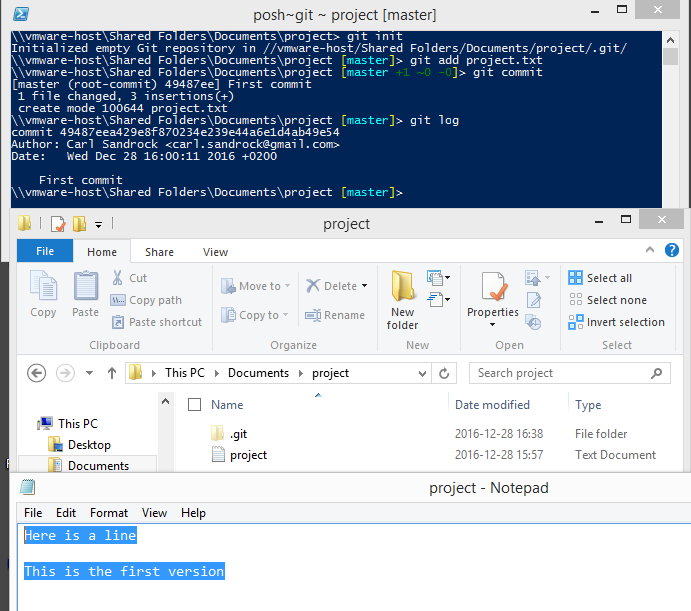
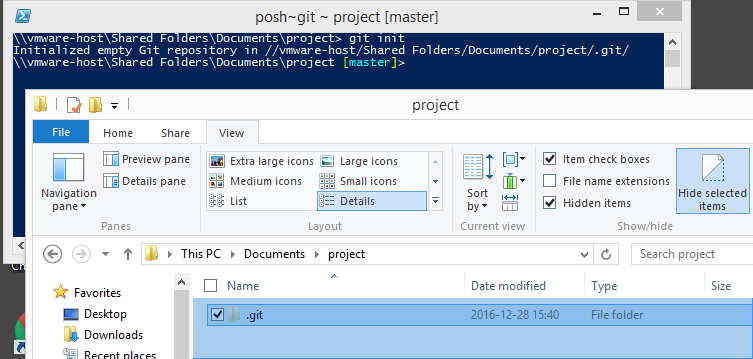
    The command git init will create a folder called .git. This contains all the commits and additional metadata.
    Now, we create a file called project.txt and write some lines in it. To get it into the repository, we first git add then git commit. Once this is done, we can check the history with git log.
    Note that the log shows who made the commit, a note about the commit and the exact time it was made. If we continue to add new commits in a linear fashion we have completely replaced the filename method. Also note that the commit itself has a name which is a long string of hex digits (49487eea429e8f870234e239e44a6e1d4ab49e54 in the screenshot). This is a hash, or a number made up by boiling down the contents of all the files in the commit. This means each commit with different files should have a unique name.
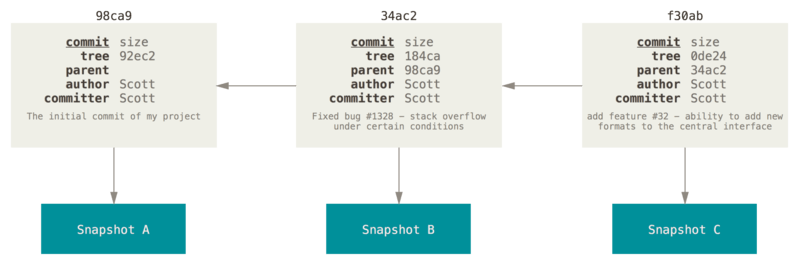
    Another interesting aspect of a git commit is that it knows which commit came before it. So in the picture below showing multiple commits, each one points to the one before.

    Space

    To handle the space dimension, git supplies the clone command which allows us to create a copy of a repository. This is different from simply copying the folder, because the clone command will allow us to track the different repositories. This can be done on a local system, for instance to make a copy of the repository on a removable drive. It can also be done over a network, and is the mechanism behind being able to have a version of the repository on a web server like GitHub.

    Concept

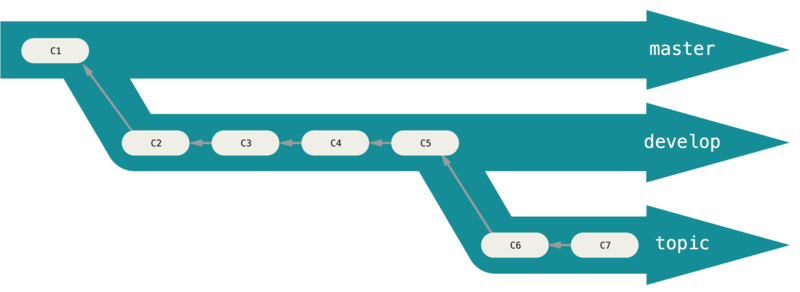
    Lastly, when we want to have different concepts and compare them to one another, we can create branches with git branch. It is easier to think of branches as groups for commits. This allows us to continue development in one group while easily going back to another. This is something which has no equivalent in the filename system

    Final word and further reading

    Now, this is not supposed to be a git tutorial. It was meant to show the things we need version control for and what git supplies to fix them. If I have succeeded in whetting your appetite, I highly recommend that you download git and read the git book (at least the first couple of chapters).
  • Appearance vs semantics

    As our department’s go-to guy for computer-related queries, I have been involved in ushering many people from Word to LaTeX and more recently Markdown (via Jupyter Notebooks). I find myself repeating some thoughts over and over again, so I thought I would take the time to write them down this time rather than have another discussion about it.

    Formatting and meaning

    Many modern computer users use direct manipulation tools like Word in a way which achieves the layout and look of the document they are working on in the shortest amount of time possible. This often involves direct formatting. Many Word users do not use styles or really think about the semantics of their document layout at all. Semantics in this context means that there are two layers to the appearance of documents. I can emphasize a word by writing it in italics. In Word, I simply apply the formatting. But the action of formatting is the same whether I am applying italics because I want to add emphasis or because I want to format a species name like Saccharomyces cerevisiae. The formatting is handled by the tool, and the semantics are not encoded in the document at all. A human writer or reader would reconstruct the semantics from context, distinguishing between the italics used for emphasis and the italics used for a species name.

    When I started learning how to use LaTeX I was converted to this philosophy of adding semantic content to the document and allowing the document generator to make decisions about how it would look. The LaTeX way of handling the formatting in the previous paragraph would be to use emph{ephasize} for the emphasis and species{Saccharomyces cerevisiae} for the species. So if you’re doing LaTeX the way its creators intended it to be used, you end up looking at a document layer with the words you are writing and the meaning you intend it to have, but not seeing what it looks like until you compile the document. This allows for a great amount of flexibility. I may decide later that emphasis works better when bold rather than italic, for instance.

    The most common issue new users of LaTeX have with the system is that it is often hard to apply the formatting they want. I think this is a direct cause of them not having considered the semantics of their formatting. They just want to know how to get the text to be bold, or a different font or colour or alignment, which are all very simple operations in Word, but often quite hard in LaTeX, for the very reason that LaTeX was designed to separate these small formatting concerns from the meaning layer.

    Now, if you are a certain type of Word user, you may be saying that these concerns look very much like using styles. You would be right. My experience with Word users, however, shows that very few of them aim for purity in their application of styles, and the whole interface of Word is asking you to simply click the formatting buttons you need to get the document to look like you want it to look.

    The web dimension

    Although LaTeX and Word are different regarding the encoding of meaning, their default use is still focused on producing a document within a relatively fixed layout. For the vast majority of users, the target is to produce an A4 page which will either be printed and read or be shown in a simulation of a sequence of A4 pages in an environment like Adobe Acrobat or even just Word itself. Choosing a paper size makes some other choices relatively easy. It is easy to know what size fonts should be displayed as, or what size a picture will be and where it is on the page, as all these things have simple unambiguous answers when working with print.
    The web changes these assumptions greatly. Every viewer is likely to have, if not a different size screen on their device, then a different size for their window. They may have different fonts installed on their system and they may even have overridden their preferences so that their fonts display differently. HTML was designed with a similar philosophy to LaTeX in that the tags encode semantics more than appearance. There is even a kind of similarity to the code. For instance, to emphasise text, you could do emphasis, allowing the same flexibility of formatting I mentioned earlier. Of course, there are also direct formatting tags, but many people advocate removing as much of the formatting details from your HTML as you can, relying on CSS to style the output document. The amazing results of this can be seen at sites such as the CSS Zen Garden, where the same document can look very different depending on the styling supplied. 
    Even if we’re not going over the top like the Zen Garden, we may see the benefit of allowing flexible layout when rescaling a window or viewing a web page on a phone with a smaller screen. I think everyone can agree it is more convenient to view a web page which nicely reflows and uses sensible font sizes, than trying to read a PDF on your phone.

    Markdown (and the Jupyter Notebook)

    This brings me to Markdown, which aims to be a more easily writable format for producing HTML. It is being used as the default text entry method in Slack and the Jupyter Notebook. Since it is aimed primarily at the Web, it inherits many of the semantics/formatting distinctions from the other tools. When you look at the syntax of Markdown, you will notice that there are very few commands or formatting options which allow the user to determine what text will end up looking like. This is disconcerting for users who are used to applying formatting for the sole purpose of obtaining a particular visual result, and they often end up hunting through the various options to get the effect that they are looking for without thinking about the semantics. I recently found a document where the author had used #### in front of a paragraph in order to obtain a bold text effect when in fact #### is used to produce a level 4 heading.

    Formatting advice

    Now that I have talked about what I see as one of the major conceptual hurdles encountered by people migrating from Word, let me give my advice. When producing a document using one of the markup systems, resist the temptation of applying any direct formatting in the first draft. Focus on the content of the document and apply semantic markup only. Distinguish between heading levels using the tools provided (section,

    or #). Restrict your check of the rendering to check that there are no errors in the processing (so don’t check if the document “looks” right, just check that all the text you have written ended up in the final output and has the appropriate semantics). Once you have done that, figure out how to handle formatting in a way which doesn’t require direct formatting. Style files for LaTeX, CSS for HTML and Markdown which results in HTML output. Also, before you start fiddling with the formatting, try hard to live with the default formatting, as this will allow the maximal freedom for downstream users. When you make a decision about how wide the text should be because it looks good on your screen, you may be negatively affecting the experience of a user with a wider or narrower screen. Similarly, try to be considerate of scaling in inserting things like pictures. Avoid direct sizes like 300px and rather use relative sizes (like 60% if you want the picture relative to the screen size, or 100em if you want it relative to the font size), this will make your output scale correctly on output devices.

    If you are viewing your output on a web browser, try to change the size of the window and see if the formatting is still the way you like it. In almost all cases, it will be better to avoid formatting and allow the browser to figure out how to display things rather than micro-managing it.

    Special characters and math

    My final note is about special characters and math. Many word users still use the Symbol font to include special characters in their text. The Unicode standard has solved this problem in a far better way. The drawback of using Symbol in Word is that it doesn’t allow for easy reformatting of your document later. For instance, if I had used a capital D and symbol font instead of ∆ in this sentence, you wouldn’t be able to select it and reformat it in Arial, as the symbol would turn back to a D! Using proper Unicode symbols allows you to copy and paste into text-only fields on Facebook, WhatsApp Web, Slack and the Jupyter Notebook. Learn how to do entry for the platform you are using.
    For mathematical formulae, it is worth your while to learn a little bit of LaTeX math syntax. It is memorable and easy to type and is used in the latest version of the Word equation editor:
    These shortcuts will save you time in all these environments and are the same in the Jupyter Notebook.
  • Efficient compiled binaries aren’t “running C code”

    I use Python for most of my programming needs, and since the CPython interpreter is not particularly efficient, it is relatively common for people to write the CPU-intensive bits of their code in other languages like C, C++ or (for numerical work) Fortran. Python allows for a great deal of flexibility in defining modules in other languages and using their compiled routines with little overhead.

    I have developed an issue about how people talk about this as though the languages themselves were in play at that inner level. People will often say: “Python is slow”, then when you point out that libraries like NumPy make many tasks quite fast, they will retort that NumPy calls out to C and Fortran extension code. Often they will express this as actually “running C code”. I take issue with this, because there isn’t much left of the original language when compiling to native machine instructions. Any toolchain which allows you to produce efficient binaries could have been used.

    This argument relates to a similar argument which has C being the base of all languages, since many interpreters and compilers are themselves written in C. People will sometimes scoff at people using other languages because those languages are effectively a thin wrapper around the “underlying” C code. This is wrong, because if you wrote a compiler for a new language in C and compiled it to produce a binary, the binary you are running which compiles your new language is an independent thing.

    Many languages are self-hosting, which means that their compilers are written in the languages themselves. This is not surprising when you consider that the first C compiler was probably developed through a bootstrapping process which may have included manual assembly of code to a rudimentary compiler, which was then used to compile subsequent versions. Once a good compiler exists, it is unnecessary to bootstrap this way. You’re probably better off just writing your compiler in a different language which already has a good compiler. In fact, you may be able to save time by writing a compiler which produces C code rather than native machine instructions, and then use a C compiler to compile that code. Self-hosting is a useful way to show the completeness of your language, but it is not required for your language to be an independent thing.

    It can be hard to reason about this Inception-like chain of compilers producing compilers, but luckily one doesn’t actually have to. Once you have a compiler which takes code written in a language and produces a runnable executable, the language actually doesn’t matter. In the case of Python, there is an interpreter running at runtime, so it is accurate so say that the particular interpreter is executing tasks slowly. But importantly, the language Python is different from a particular interpreter. I can run the same Python program on CPython, PyPy, IronPython or Jython and get different performance due to the details of how each interpreter interprets the code. Even these interpreters aren’t actually running the code as I wrote it line by line, but rather executing a bytecode version of the code which is the result of a compilation step. This distinction is meaningless in practice, as the mapping of Python code to bytecode is quite simple and relatively one-to-one, unlike the mapping from C code to machine instructions, where most compilers will apply optimisations such that the final instructions are often very different from the code you wrote.

    In summary, languages aren’t fast or slow – interpreters or compilers are more or less efficient. Back to the first point, it may be more accurate to describe the speed benefit obtained by using NumPy as being from using efficient compiled routines rather than “running C code”.

  • Why don’t we just do solar instead of nuclear?

    I’ve been seeing a lot of people complaining about the nuclear deal. There seems to be an especially vocal group who feel that we should be investing in renewables rather than nuclear. Some of these people hold up Fukushima as a warning about how bad things can go with nuclear power. There’s a lot to say about this topic, and I’m not going to take the time to write a book about it, just drop some links and facts for the interested reader.

    First, Fukushima is not as bad as you may think. Specifically, no-one died or is projected to die due to radiation released at Fukushima.
    Second, we want less CO₂ to be produced in the production of our electricity needs, we need to move away from fossil fuels. The nuclear advocates and the solar advocates usually agree on this. The problem is that nuclear fills a niche that solar really struggles with: base load. I went hunting for the most recent information on the South African situation, and I came across this presentation which shows the problem with South African power quite clearly – there are large peaks in usage in the morning and the afternoon in winter. This Eskom infographic has a nicer display of the winter and summer behaviour. I also tried to find good information on the insolation in SA and ended up choosing a weather station in the Richtersveldt for my data since it is located in a nice open area in the best solar position in the country. When you plot these together, you get this graph:
    Power / GW vs Time

    Notice how the peaks take place at times where there isn’t really much sun. This means solar power can’t really supply the power for those peaks directly. More importantly, it can’t help with the minimum demand at 02:00. We would have to store the energy somehow.

    Another issue often bandied about in these conversations is how expensive the nuclear plants would be. The figures I’ve heard are that the nuclear deal is perhaps going to cost around R1.2T for 9.6 GW of nuclear nameplate capacity. People look at that and think “if Solar PV costs around $3/W, we could build the same solar capacity for a fraction of the price”.  The problem, of course, is that the capacity factors for the two technologies aren’t the same. For nuclear they’re around 90%, while for solar they’re around 20 %. This means we would need to install around 43 GW of nameplate capacity solar to produce the same amount of electricity, which costs more than R1.2T just by itself at $3/W. Then we would have to pay for the storage and the refitting of our grid to allow for the distributed generation which the solar plants would inevitably represent. I love solar, but we’re not at the point where it can do the base load generation we would be purchasing with nuclear.